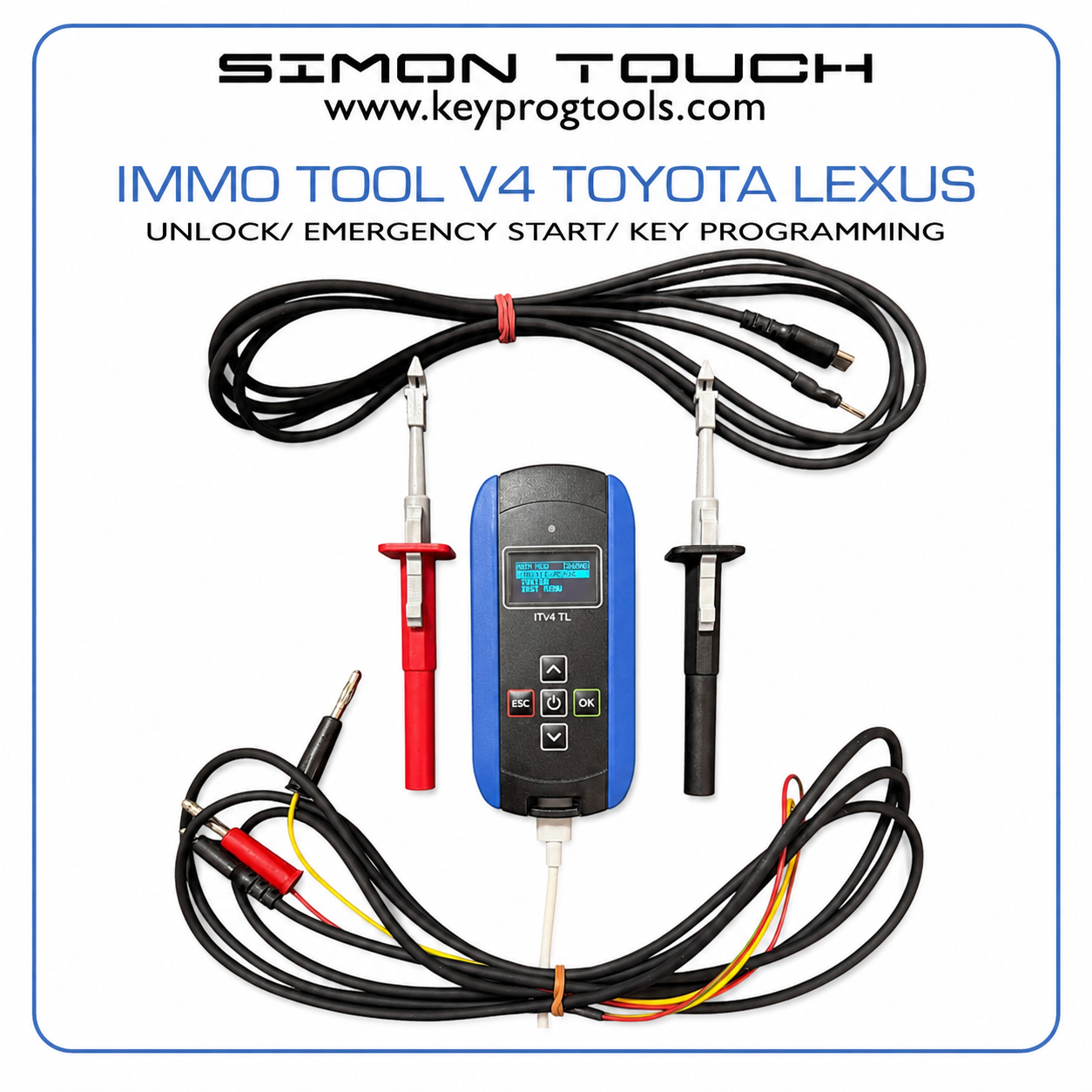
Supported Models:
Device supporting all TOYOTA/LEXUS/MAZDA/SUBARU/SUZUKI 2016-2025 cars with the
type of Smart Key Module listed below :
TMLF19Tx TOKAI RIKA (with Key HTAES 4A-BA)
TMLF19Dx DENSO (with Key DSTAES 8A- B9/BA, 8A-B7/B8(!NEW!)):
TMLF18Dx DENSO (with Key HTAES 4A-AA) (!NEW!)
TMLF15-x DENSO (with Key DSTAES 8A-A9/AA) (!NEW!)
TS-xTY TOKAI RIKA (with Key DSTAES 8A-39) (!NEW!)
Key 8A-B7/B8, 8A-B9/BA (DST-AES), module TMLF19D-x:
Toyota:
BZ4X 2022…
C-HR PHV 08/2023…
HIGHLANDER 2024…
LAND CRUISIER 250 2024…
LAND CRUISIER 300 2021…
PRIUS 2023…
RAV4 2023…
SEQUOIA 2023…
SIENNA 2021…
TACOMA 2024…
TUNDRA 2022…
Lexus:
GX550 2023…
LBX 2023…
LM 2023…
LX 2021…
NX 2021…
RX 2022…
RZ 2022…
UX 2023…
Other:
SUBARU SOLTERRA 2023…
SUBARU ACROSS 2021…
Toyota:
AYGO X 2022…
Camry 80 2024…
Corolla Cross 2022…
Corolla E210 Facelift 2022…
HILUX 2024…
YARIS 2020…
YARIS CROSS 2021…
Other:
Key 4A-BA (HT-AES), module TMLF19T-x:
MAZDA 2 2023…
Key 4A-AA (HT-AES), module TMLF18D1:
Toyota:
Corolla E210 2018-2021
Other:
Suzuki SWACE 2018..2021
Toyota:
AVALON 2018…2022
CAMRY 2018…2023
C-HR 2018…07/2023
HIGHLANDER 2020-2023
MIRAI 2021…2022
PRADO 2018..2022
PRIUS 2016…2022
RAV4 2018..2022
SIENTA 2015…2022
Other:
Key 8A-A9, 8A-AA(DST-AES), module TMLF15-x :
Some older Lexus 2016.. supported at this key type
Key 8A-39(DST-AES), module TS-9TY, TS-GTY, RS-ATY, RS-9TY
Toyota:
AYGO 2014..2021
HILUX 2015..09/2023
INNOVA 2015…2022
Other:
PEUGEOT 108 2014…
CITROEN C1 2014…
Functionality:
Submenu “TOYOTA”:
“Read ECU & Open” - Read IMMO Data from smart key module by CAN BUS, unlock
car and disarm car Alarm. Data can be saved to 1 of 10 Car Data Files. Time around 5
In version 1.70 after selecting this function need to choose first correct type of 5 car modules:
1: TMLF19D 8A-Bx (8A-B7, 8A-B8, 8A-B9, 8A-BA)
Use this for all other cars than in pos 2…5.
This work for cars with 8A-B7(NEW!), 8A-B8(NEW!), 8A-B9, 8A-BA (DST-AES) keys.
2: TMLF19T 4A-BA
Use this for Aygo X, Camry 80 2024..., Corolla 2022.., Hilux 2024…, Mazda2 2023.., Yaris 2021..
This work for cars with 4A-BA (HT-AES) keys.
3: TMLF18D 4A-AA
Use this for Suzuki Swace, Corolla 2018..2021,
This Work for cars with 4A-AA (HT-AES) keys.
4: TMLF15 8A-A9/AA
Use this for IZOA 2018-2022, PRADO 2018-2022, PRIUS 2016..2022, SIENTA 2015-2022, CHR 2018-2023,
CAMRY 2018-2023, AVALON 2018..2022, HIGHLANDER 2020..2022, MIRAI 2021..2023 RAV4 2018..2022 This
Work for cars with 8A-A9, 8A-AA (NEW!) (DST-AES)keys.
5: TS-9TY, RS-ATY 8A-39
Use this for HILUX 2015..9/2023, AYGO 2014…2021, INNOVA 2015-2022, PEUGEOT 108 2014+, CITROEN C1
This Work for cars with 8A-39 (NEW!) (DST-AES)keys.
Important Notice:
In most 2026 and some 2025 vehicles, Toyota has introduced additional security measures. To use a special
mode for reading data from the SmartKey module (such as the one used by this tool), the ignition must be
turned on with a programmed key. In such vehicles, the device displays an error code of "Error Code 1-22."
However, some 2026 cars working ok , without ignition on and valid key.
Because new passwords for accessing the TMLF19T and TMLF19D modules have been added to the device,
automatic type recognition had to be replaced with manual selection of the SmartKey module type. If the
TMLF19D type is used instead of the TMLF19T, or vice versa, the SmartKey module will temporarily block access
to the data reading function. In such a situation, the device returns an error code: "Error Code 2-37" and in
order for the device to work even in the correct mode, you must wait a few minutes or disconnect the power
supply from the smartkey module.
3. 4. 5. 6. 7. “Emerg START” - Emergency Car Start by internal Emulating key 4A(HTAES) or 8A(
DSTAES) with 1 of 10 saved car data files by “Read ECU & Open” function .
“Add KEY” – Registering new Keys to Car.
“Erase Keys” – Erasing not required or losted keys from car.
“Sync ELV & IDC” – Synchronisation of ELV and ID Codebox with Smrt key module. This
also repairing remote control synchronisation when stop working after key
“Open by CAN” – Open or close car function by can bus with 1 of 10 car data files.
“Read ECU PartNR” - Function for read SMARTKEY module Part number without
removing
Submenu “SYSTEM”:
“USB PC Link” – Running USB connection for Device updating .
“Device Info” – Device information – Serial Number,Version etc.
“Activations” – Informations about internal software activation.
“Battery Volt” – Voltage of internal baterry used for device security.
“Format FLASH” – format internal flash disk – !!! IT ERASE ALL CAR DATA FILES !!!.
“USB MSD Disk” – Run USB MSD disk for see and/or copy/delete internal Car Data
INTRODUCTION
The device works using the CANBUS communication network implemented in all
supported cars. For use our device it is necessary to make direct contact with this
network, by connect the contact probes of the device to the wires of the CANBUS
In most supported models, the CAN BUS wires to which you need to connect are located in
the same places, but some cars have differences, below are examples of how
access to the (CAN BUS ) network can be achieved in different Lexus and Toyota models.
After making sure that the test probes are correctly connected to the wires of the CANBUS
network, you can Read Car data to file and unlock, program or erase keys and make ELV/ID
Box synchronisation. Emergency start of the vehicle not need CANBUS wires connections –
it just emulating one of existing keys in car for run the car.
CANBUS network wires are always 2 wires twisted together so you need to look for this.
2. 3. 4. 5. 6. FUNCTION DESCRIPTION
POWER ON – Press and hold power button till device will switch on then release the
power on button. Device will go to normal or fast menu(depended of last setting)
POWER OFF – Press and hold power button till device will switch off.
Charging Device – use USB C standard charger for charge the internal battery. When
charging is in progress red LED will be lighted on and on charging complette will light
Read ECU & OPEN – after test probes are connected to can bus wires run :
“TOYOTA->Read ECU & Open” function, first you need to choose type of Smartkey
module(one of TMLF19D 8A-B9/A, TMLF19T 4A-BA, TMLF18D 4A-AA), after this you
will see “SELECT CAR DATA” request. Press UP/DN button to select 1 of 10 car file data
On each car data number you will see state of this data bank (Empty/DataOK)
and key type (4A-AA/4A-BA/8A-B9/8A-BA).
When you choose 1 of 10 car data number press OK. Then device start to try
connection by CANBUS with car Smartkey module. If CANBUS probes are connected
corectly you will quickly see “CAN-UDS OK”, ECU will be readed in ~3..5 seconds, data
will be saved and car unlocked and disarmed. After all complete you should see:
ECU READ OK!
KeyType : 8A-B9/8A-BA/4A-AA/4A-BA
Save CarNr: 2 OK
Press OK
If CANBUS probes was connected wrongly disconnect USB plug from device, reverse
position of probes/find correct wires in car and connect again USB plug to device.
If this time CANBUS probes was connected OK you will quickly see “CAN-UDS OK”.
Always when you playing with probes connection keep USB plug disconnected from
“Emerg START” – first select by UP/DN button 1 of 10 car file data number (same that
stored for this car). If device was not powered off after Read ECU & Open function the
number will be initially same as you readed for this car. Then Press OK. You will see:
START
CarData NR: 2
KeyType: 8A-B9/8A-BA/4A-AA/4A-BA
ESC- Exit
Then Key Emulator are ready for use. Put top of device vertically to the START BUTTON
of car and press START Button. Ignition will switch ON and car is ready to drive.
CANBUS probes are not requires for this option.
“Add Keys” – First device ask you to select car data file number(1..10). then run the
Next you need to put top of device to start button because need to insert
working key first and device emulate also working key same as in emergency start.
8. 9. Then you will see request to put new key to start button. After complette you will see
new key count and info about the result.
CANBUS probes connection are requires for this option.
“Erase Keys” - First device ask you to select car data file number(1..10). then press ok
to run the procedure. Next you need to put eachworking keys that must be not erased
to the start button , one by one. After each key placed to the start button you will see
its count on display. Wait till end of this procedure and then you will see new key count
and info about the result.
CANBUS probes connection are requires for this option.
“Sync ELV & IDC” - First device ask you to select car data file number(1..10). then press
OK to run the procedure. Next device ask you to turn ignition on. You can use car Key
or device as key emulator. After ignition on press ok and wait till end of procedure.
You will see info about the result.
CANBUS probes connection are requires for this option.
“Open by CAN” - First device ask you to select car data file number(1..10). then press
You will see:
UP – OPEN
DN – CLOSE
ESC – Exit
CANBUS probes connection are requires for this option.
UPDATE HISTORY:
ver1.72: - Added support for new LEXUS 2025 keys 8A-B7,8A-B8 on TMLF19D
Added new version of TMLF15-x modules
ver1.71: -Added new version of TMLF19D, TMLF19T, TMLF15 modules
ver1.70: - Added support for new types of modules:
TMLF15-1/2/3 ( key 8A-A9/AA)
TS-9TY, TS-ATY, TS-GTY, RS-9TY (Key 8A-39)
ver1.61: - Bug Fix in some modules of TMLF19D “Error Code 10-01”
ver1.60: - Added new version of TMLF19D and TMLF19T module types
ver1.51: - First fully working Release.